Use this rounding calculator to round a number to a chosen place, from three decimal places to the nearest billion. Enter your number, select the precision, and read the rounded result.
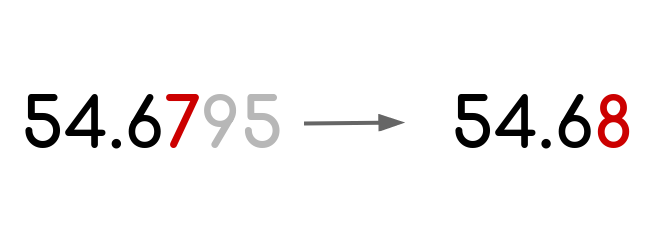
For example, 43.674 rounded to the nearest whole number is 44. Rounded to the nearest hundredth, it is 43.67. The number stays the same; the precision determines how much detail you retain.
How to use the rounding numbers calculator
- Enter a value in “Number.” You can use a positive or negative number, with or without a decimal part.
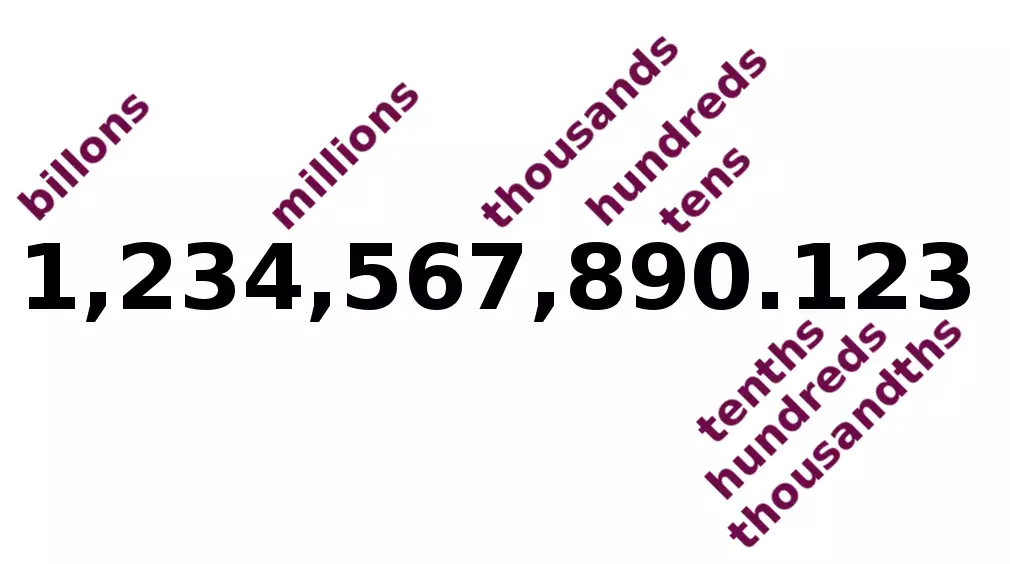
- Choose an option in “Round to.” Select thousandths, hundredths, tenths, an integer, tens, hundreds, thousands, millions, or billions.
- Read “Rounded number.” This is your number rounded to the selected place.
The calculator uses a nearest-value rounding formula. It does not have a separate rounding-method selector for options such as ceiling, floor, or half to even.
Choosing the right rounding precision
Decimal places count digits after the decimal point. Whole-number places identify multiples of ten, one hundred, and larger values. Here is how each available setting affects the same number:
| “Round to” setting | Nearest multiple of | Result for 12,345.6789 |
|---|---|---|
| Thousandth (3 decimals) | 0.001 | 12,345.679 |
| Hundredth (2 decimals) | 0.01 | 12,345.68 |
| Tenth (1 decimal) | 0.1 | 12,345.7 |
| Integer | 1 | 12,346 |
| Tens | 10 | 12,350 |
| Hundreds | 100 | 12,300 |
| Thousands | 1,000 | 12,000 |
| Millions | 1,000,000 | 0 |
| Billions | 1,000,000,000 | 0 |
Hundreds and hundredths are very different. Rounding 123.456 to the nearest hundred gives 100; rounding it to the nearest hundredth gives 123.46.
A result of zero at a large rounding place does not mean the original quantity was zero. It means zero is the closest multiple at that precision. For example, 12,345.6789 is much closer to zero than to one million.
How the rounding calculation works
The calculator scales your number, rounds the scaled value to an integer, and then reverses the scaling:
Rounded number = round(a × 10r) ÷ 10r
- a is the number you enter.
- r represents the selected place: 3 for thousandths, 2 for hundredths, 1 for tenths, and 0 for an integer.
- Negative values of r represent whole-number places: −1 for tens, −2 for hundreds, −3 for thousands, −6 for millions, and −9 for billions.
- round() rounds the scaled value to the nearest integer, using the calculation engine’s tie-breaking convention for exact halfway values.
Worked example: round to the nearest hundredth
To round 43.674 to two decimal places, use r = 2:
- Multiply by 100: 43.674 × 100 = 4,367.4.
- Round to the nearest integer: 4,367.4 becomes 4,367.
- Divide by 100: 4,367 ÷ 100 = 43.67.
For a whole-number place, the scaling works in the opposite direction. To round 12,678 to the nearest hundred, divide by 100 to get 126.78, round to 127, then multiply by 100 to get 12,700.
Understanding your rounded result
Negative numbers still round to the nearest value
Rounding does not always mean making a number larger. For example, −12.678 rounded to the nearest hundredth is −12.68, because that is closer than −12.67. Likewise, −12.3 rounded to an integer is −12, not −13.
This differs from floor, which always rounds toward negative infinity, and ceiling, which always rounds toward positive infinity.
Exact halfway values depend on the rounding convention
A value such as 2.5 is equally close to 2 and 3. Half-away-from-zero rounding gives 3, while half-to-even rounding gives 2. These are different rules for resolving a tie, not different choices of precision.
The supplied calculation formula uses round() without identifying its exact-halfway convention. If your task requires a specific rule, particularly for accounting or compliance, verify that convention rather than assuming all tools handle ties alike. For background on the alternatives, see this explanation of rounding conventions.
Carrying can change digits beyond the selected place
Rounding 9.998 to two decimal places gives 10.00: the increase carries through the hundredths and tenths into the whole-number part. Similarly, 999 rounded to the nearest ten is 1,000.
Numerically, 10 and 10.00 are equal. Writing 10.00 communicates two decimal places, but a numeric result field may omit trailing zeros.
Decimal places are not significant figures
Decimal places count from the decimal point; significant figures count from the first nonzero digit. For example, 0.0123 rounded to two decimal places is 0.01, but rounded to two significant figures it is 0.012. This calculator selects a place value, not a number of significant figures.
Using rounded numbers in practice

- Reports and estimates: Round large totals to thousands or millions when readers need the overall scale rather than every digit. Label the units clearly.
- Money: Choose precision according to the currency and task. Rounding each line item can produce a different total from rounding only the final sum.
- Measurements: Choose a precision that suits the measurement. Adding displayed decimal places does not make the original measurement more accurate.
Keep extra precision during calculations and round the final result when possible. Repeated rounding can change the answer. Always start from the original number when comparing different precision settings.
Related rounding calculators
- Use the rounding fractions calculator when your starting value is a fraction rather than a decimal.
- Use the rounding money calculator for currency-focused examples and rounding methods.
If your business needs consistent rounding in customer estimates, you can build a custom calculator with Calcopolis that applies your pricing precision and collects quote-request details.