This rounding money calculator rounds an amount to the nearest cent, tenth of a dollar, whole dollar, or larger place value. Use it to simplify budget estimates, present financial totals, or check how much a rounding choice changes an amount.
How to use the rounding money calculator
- Enter the Amount. Include any decimal places you want considered, such as 12345.6789.
- Choose Round to. Select Hundredth for cents, Tenth for tenths of a dollar, Nearest dollar for whole dollars, or a larger place value.
- Read the Rounded amount. The result is the nearest multiple of your selected rounding increment.
The calculator displays dollar units. The arithmetic also applies to other currencies, but it does not convert exchange rates or apply currency-specific payment rules.
| Round to | Rounding increment | Example amount | Rounded amount |
|---|---|---|---|
| Hundredth (2 decimal) | $0.01 | $12,345.6789 | $12,345.68 |
| Tenth (1 decimal) | $0.10 | $12,345.6789 | $12,345.7 |
| Nearest dollar | $1 | $12,345.6789 | $12,346 |
| Tens | $10 | $12,345.6789 | $12,350 |
| Hundreds | $100 | $12,345.6789 | $12,300 |
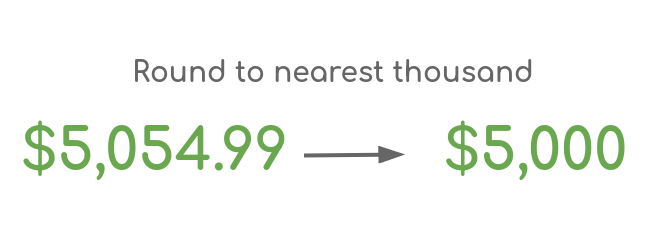
| Thousands | $1,000 | $12,345.6789 | $12,000 |
| Millions | $1,000,000 | $12,345,678.90 | $12,000,000 |
| Billions | $1,000,000,000 | $12,345,678,900 | $12,000,000,000 |
Check the selected precision: the default is Tens, not cents. A small amount can round to zero when you choose a much larger increment—for example, $400 rounded to the nearest thousand is $0.
How does the money rounding calculation work?
The calculator scales the amount, rounds it to a whole number, and then reverses the scaling:
Rounded amount = round(a × 10r) ÷ 10r
- a is the amount you enter.
- r represents the selected precision: 2 for cents, 1 for tenths, 0 for dollars, −1 for tens, −2 for hundreds, −3 for thousands, −6 for millions, and −9 for billions.
- round() rounds the scaled value to the nearest integer.
For example, rounding $4.2341 to the nearest cent uses r = 2:
- Multiply by 100: 4.2341 × 100 = 423.41.
- Round to the nearest integer: 423.
- Divide by 100: 423 ÷ 100 = $4.23.
The rounded value is $0.0041 below the original amount. Rounding changes precision; it does not preserve every fraction of a cent.
How do you round money to the nearest dollar?
Choose Nearest dollar. For a positive amount, a fractional part below $0.50 rounds to the lower dollar, while a fractional part above $0.50 rounds to the higher dollar.
- $12.39 rounds to $12.
- $12.68 rounds to $13.
- $12.99 rounds to $13, not $12. Rounding is different from simply deleting the decimals.
What happens at exactly halfway?
Exact halfway values depend on the tie-breaking convention. Under round half up, $12.50 becomes $13; under round half to even, it becomes $12 because 12 is even.
This calculator has a fixed rounding operation, not a rounding-method selector. Its formula does not identify the tie-breaking convention. If an exact midpoint matters for accounting, taxes, or negative adjustments, verify that the result matches your required policy rather than assuming a particular convention.
When is rounding money useful?
- Budget estimates: round expenses to whole dollars or tens to make a planning worksheet easier to scan. Keep the original amounts for reconciliation.
- Financial summaries: present large totals to the nearest thousand or million. Label the precision so readers know the figures are approximate.
- Price calculations: check a calculated price at cent precision after applying a rate or percentage, subject to your billing rules.
- Comparing proposals: use the same precision for every quote so differences in presentation do not distract from the underlying amounts.
Nearest-value rounding is not a guaranteed spending buffer. If you need an estimate that never understates costs, a round-up policy may be more appropriate; that is a different operation from this calculator’s nearest-value rounding.
Common money rounding mistakes
Rounding each item instead of the final total
The order of operations can change a total. Suppose three calculated charges are $1.234 each:
- Round each charge first: $1.23 × 3 = $3.69.
- Add first, then round: $1.234 × 3 = $3.702, which rounds to $3.70.
Neither approach is universally correct for every invoice. Follow the applicable billing or tax rule. For estimates without a prescribed rule, retaining precision until the final step helps avoid intermediate rounding differences. Repeated calculation errors are also discussed in this overview of compounding errors.
Confusing decimal rounding with cash rounding
Rounding to cents means rounding to multiples of $0.01. Cash rounding may instead require multiples of $0.05 or another payment increment. This calculator does not offer a five-cent increment or automatically apply local cash-payment rules.
Treating a rounded display as an exact accounting value
A result of 4.2 is numerically equal to $4.20, but displaying two decimal places is a formatting choice. Also, rounding a figure for a report does not mean you should replace the precise value in your accounting records. Check the relevant instructions before rounding invoice, payroll, or tax amounts.
Related calculators
- Use the Rounding Calculator to explore other rounding techniques.
- Use the Sales tax (VAT) calculator to calculate net and gross amounts before applying the rounding policy required for your transaction.
Need customer estimates that follow your pricing rules? Calcopolis lets you build a custom pricing calculator or quote form with calculations suited to your business.