Use this margin calculator to calculate gross profit margin from selling price and cost, or find the selling price needed for a target margin. You can also calculate allowable cost, markup percentage, or a selling price based on markup.
Margin measures how much of each sales dollar remains after the cost you enter. When that cost is the cost of goods sold, the result is gross profit margin—not net profit margin.
How to use the margin calculator
- Choose your calculation from the “Calculate” menu.
- Enter the requested amounts. Cost, Price, and Profit are dollar amounts. Enter Margin and Markup as percentages: use 20 for 20%, not 0.20.
- Interpret the result using the same cost basis. A calculation based only on product cost does not account for every expense of running your business.
| Calculation option | What to enter | Result |
|---|---|---|
| Final price by target margin | Cost and target Margin | Selling price required to achieve that margin |
| Final margin using price and cost | Price and Cost | Margin percentage |
| Cost using price and target margin | Price and target Margin | Maximum cost consistent with that target |
| Markup by cost and target profit | Cost and target Profit in dollars | Markup percentage |
| Final price by cost and target markup | Cost and target Markup | Selling price after applying the markup |
Use amounts for the same unit or period: one product’s cost with its selling price, or total cost of goods sold with total sales revenue. Do not combine a per-unit cost with revenue from multiple units.
How to calculate margin
The gross margin formula divides gross profit by selling price:
Gross profit = Selling price − Cost
Margin (%) = (Selling price − Cost) ÷ Selling price × 100
Gross profit is a dollar amount; margin is a percentage. For example, a 20% gross margin means $0.20 of each $1 in sales remains after the entered product cost, before other expenses.
Formulas for price, cost, and markup
The calculator rearranges the margin formula or applies markup depending on your selected mode. In the formulas below, percentage values are entered as whole percentages—for example, 20 for 20%.
| What you want to find | Formula |
|---|---|
| Price from target margin | Price = Cost ÷ (1 − Margin ÷ 100) |
| Cost from price and target margin | Cost = Price × (1 − Margin ÷ 100) |
| Markup from cost and target profit | Markup (%) = Profit ÷ Cost × 100 |
| Price from target markup | Price = Cost × (1 + Markup ÷ 100) |
For a positive cost and selling price, a target margin must be below 100%. A 100% target makes the price formula undefined. Calculating margin requires a nonzero selling price, and calculating markup requires a nonzero cost.
Worked example: $100 cost and a 20% target margin
Suppose a product costs $100 and you want a 20% gross margin:
Price = $100 ÷ (1 − 20 ÷ 100) = $125
At that price:
- Gross profit: $125 − $100 = $25.
- Margin: $25 ÷ $125 × 100 = 20%.
- Markup: $25 ÷ $100 × 100 = 25%.
You can also work backward: a $125 selling price and 20% target margin allow a maximum cost of $125 × 0.80 = $100.
Margin vs. markup: why the difference matters
Margin uses selling price as its denominator; markup uses cost. They describe the same dollar profit from different starting points, so the percentages are not interchangeable.
Adding 20% to a $100 cost produces a $120 selling price. That is a 20% markup, but the margin is only $20 ÷ $120 × 100 = 16.67%. To achieve a 20% margin, you need the $125 price shown above.
To convert a target margin to markup:
Markup (%) = Margin ÷ (100 − Margin) × 100
For more cost-based pricing calculations, use the markup calculator.
What your margin result does—and does not—tell you
- A positive margin means the selling price exceeds the entered cost.
- A zero margin means price equals the entered cost. It does not mean the business has covered its overhead.
- A negative margin means the item sells for less than the entered cost.
A higher margin leaves more revenue available for other expenses and profit, but it does not guarantee higher total earnings. Sales volume, returns, operating expenses, and customer acquisition costs also matter. There is no single “good” margin for every business.
Gross margin, contribution margin, and net profit margin
The arithmetic uses whichever cost you enter; the meaning of the result depends on what that cost includes.
- Gross margin uses cost of goods sold, which may include purchase costs or production costs such as direct materials, labor, and allocated manufacturing overhead.
- Contribution margin deducts variable costs. Depending on the business, these can include product costs, packaging, payment fees, commissions, and seller-paid shipping. Use the contribution margin calculator to explore this measure.
- Net profit margin is net income divided by revenue. It accounts for all recognized expenses, including operating expenses, interest, and income taxes—not just transaction costs.
Subtracting shipping and payment fees does not, by itself, turn gross margin into net profit margin. You still need to consider overhead, including relevant fixed costs, when assessing overall profitability.
Keep sales tax and VAT consistent
Do not mix a tax-exclusive cost with a tax-inclusive selling price. For an accounting gross margin calculation, generally use revenue excluding sales tax collected for the tax authority. Exclude recoverable input VAT from cost; nonrecoverable taxes may form part of cost.
For example, assume a product costs $50 excluding recoverable VAT and sells for $120 including 20% VAT:
- Revenue excluding VAT: $120 ÷ 1.20 = $100.
- Correct gross margin: ($100 − $50) ÷ $100 × 100 = 50%.
- Incorrect mixed-basis calculation: ($120 − $50) ÷ $120 × 100 = 58.33%.
The mixed-basis calculation overstates margin by 8.33 percentage points. Use the net-to-gross calculator to convert tax-exclusive amounts, or the backwards tax calculator to remove tax from a tax-inclusive price.
The word “gross” in gross profit margin does not mean that your selling price should include sales tax.
Calculate margin in Excel or Google Sheets
For a product list, put tax-exclusive cost in B2 and tax-exclusive selling price in D2. Enter this formula and format the result as a percentage:
=(D2-B2)/D2
If D2 instead contains a VAT-inclusive price and C2 contains the VAT rate entered as 20%, remove VAT from the selling price first:
=(D2/(1+C2)-B2)/(D2/(1+C2))
The existing spreadsheet example below illustrates a layout with net cost, VAT, gross selling price, and margin:
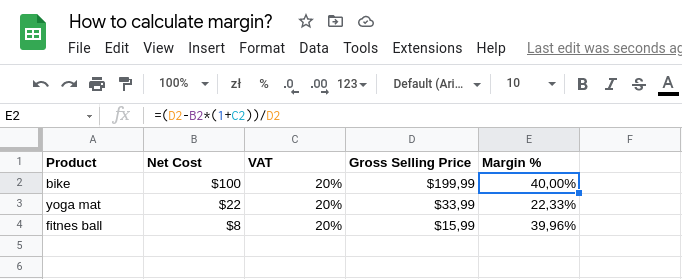
Its formula, =(D2-B2*(1+C2))/D2, gives the same margin as the VAT-removal formula above when the same VAT rate applies to cost and price and input VAT is fully recoverable. For mixed tax rates or nonrecoverable VAT, use the appropriate revenue and cost amounts rather than assuming this shortcut applies.
For an overall margin across multiple products, divide total gross profit by total revenue. Do not simply average individual product margins, because products contribute different amounts of revenue.
Use your results to make pricing decisions
- Set a purchasing limit. Enter your planned selling price and target margin to find the highest product cost that meets the target.
- Reprice after a cost increase. Use the new cost and your existing margin target to estimate the required selling price, then assess whether customers will accept it.
- Check promotions before launching. A 10% discount on the $125 example reduces price to $112.50. With cost unchanged at $100, margin falls from 20% to 11.11%. Explore scenarios with the margin after discount calculator.
For customer-facing estimates, Calcopolis lets you build a customized pricing calculator with your own cost assumptions and pricing rules, helping website visitors estimate an order before requesting a quote.