The Equivalent Rate Calculator converts a nominal annual interest rate from one compounding frequency to another while keeping the effective annual return unchanged. Use it to compare rates quoted with different compounding schedules or express an existing rate on a different basis.
The converted rate is still an annual rate. Choosing monthly compounding does not make the Equivalent Interest Rate result a monthly periodic rate.

How to use the equivalent interest rate calculator
- Enter the Nominal Interest Rate. Use the stated annual rate before allowing for compounding. Enter 5 for 5%, not 0.05. Do not enter an effective annual yield as though it were a nominal rate compounded monthly.
- Select the Base Compounding Frequency. This is how often interest compounds under the original rate.
- Select the Alternate Compounding Frequency. This is the compounding schedule for the converted nominal annual rate.
Both frequency selectors offer annually (1 period per year), semi-annually (2), quarterly (4), monthly (12), weekly (52), and daily (365).
If you know only an effective annual rate, enter that percentage with Annually as the base frequency. With one compounding period per year, the nominal and effective annual rates are equal.
What do the two results mean?
- Equivalent Interest Rate: The nominal annual rate that, when compounded at your alternate frequency, produces the same effective annual return as the original rate.
- Annual Equivalent Rate (AER): The effective annual rate produced by the original nominal rate and base compounding frequency. It includes the effect of interest earning further interest during the year.
Changing only the alternate frequency changes the Equivalent Interest Rate but leaves AER unchanged. If you select annual compounding as the alternate frequency, the two results are equal.

Equivalent rate formula and worked example
The calculation matches the annual growth factor under the original and alternate compounding schedules. Define:
- r: Original nominal annual rate as a decimal, calculated by dividing the entered percentage by 100.
- b: Base compounding periods per year.
- a: Alternate compounding periods per year.
The calculator returns the equivalent nominal annual rate as a percentage:
Equivalent Interest Rate (%) = 100 × a × [(1 + r/b)b/a − 1]

The expression inside the square brackets gives the interest rate per alternate period as a decimal. Multiplying by a annualizes that periodic rate; multiplying by 100 expresses it as a percentage.
Example: convert 5% compounded annually to monthly compounding
Enter a Nominal Interest Rate of 5%, choose Annually as the base frequency, and choose Monthly as the alternate frequency. Here, r = 0.05, b = 1, and a = 12.
Equivalent Interest Rate = 100 × 12 × [(1.05)1/12 − 1] ≈ 4.88895%

The equivalent rate is approximately 4.88895% per year compounded monthly. Its monthly periodic rate is approximately 0.407412%, found by dividing the unrounded nominal annual percentage by 12.
Both arrangements grow $10,000 to $10,500 after one year, before fees or taxes and with no deposits or withdrawals. The lower converted nominal rate does not mean a lower return: more frequent compounding makes up the difference.
How to calculate the annual equivalent rate
AER converts the original rate into its effective annual yield, regardless of the alternate frequency selected:
AER (%) = 100 × [(1 + r/b)b − 1]
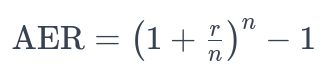
For example, a 5% nominal annual rate compounded monthly has r = 0.05 and b = 12:
AER = 100 × [(1 + 0.05/12)12 − 1] ≈ 5.1162%
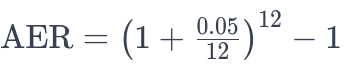
This differs from the previous example: the nominal rate is now 5% with monthly compounding, rather than annual compounding. On $10,000, it produces approximately $511.62 in interest over one year, assuming all interest remains invested.
How to use your results
- Compare savings offers on the same basis. Calculate AER for each quoted nominal rate and its actual compounding frequency. For otherwise comparable accounts, the higher AER produces more interest over a full year.
- Convert a rate for a financial model. If a model needs a monthly periodic rate, choose monthly as the alternate frequency, then divide the Equivalent Interest Rate percentage by 12. Divide by 100 as well if the model requires a decimal.
- Check an equivalent quote. Two nominal rates with different compounding schedules are equivalent only if they produce the same AER. Comparing the quoted percentages alone can be misleading.
For positive rates, moving to more frequent compounding requires a lower equivalent nominal annual rate to preserve the same annual return. Keep extra decimal places when reusing converted rates, especially over long periods.
What the calculator does not account for
The calculation assumes a constant rate, evenly spaced compounding periods, and interest retained or reinvested on the same terms. Daily means 365 periods per year and weekly means 52; a contract using another day-count convention may produce different results.
Fees, taxes, promotional rate changes, deposits, withdrawals, and loan repayment schedules are not included. AER is therefore not a complete measure of borrowing cost and should not be treated as a fee-inclusive APR. Compare those terms separately before choosing a product.
Related calculators
- Compound Interest Calculator: Estimate how a balance grows over time once you have established the rate and compounding frequency.
- Savings Calculator: Explore savings growth when you also make regular contributions.
- Inflation Calculator: Consider how changing prices affect the purchasing power of your savings.
- Retirement Goal Calculator: Put your return assumptions into the context of a longer-term savings goal.
Run a financial education or advisory website? Use Calcopolis’s WordPress calculator builder to create a branded rate-comparison tool that helps visitors evaluate savings products before making an inquiry.