This PVIFA calculator finds the present value interest factor of an annuity: the multiplier used to convert equal future payments into their value today. Use Simple mode to calculate the factor, or Advanced mode to calculate the present value of your payments as well.
The calculation assumes an ordinary annuity, meaning payments arrive at the end of each period, starting one full period from today.

How to use the PVIFA calculator
- Select a mode. Simple shows the PVIFA result. Advanced also lets you enter a payment amount and shows the present value of the annuity.
- Enter the interest rate per period as a percentage. For a 5% rate, enter 5, not 0.05. This rate is used to discount future payments to today's value.
- Enter the number of periods. Use the total number of payments, not necessarily the number of years.
- In Advanced mode, enter the amount of each payment. Payments must be equal and occur at regular intervals. The payment and present value fields are labeled in dollars.
Match the rate to the payment interval. Annual payments require an annual rate; monthly payments require a monthly rate. For example, three years of monthly payments means 36 periods. A 6% nominal annual rate compounded monthly corresponds to 0.5% per month.
If your rate is an effective annual rate instead, convert it using: monthly rate = [(1 + annual rate)1/12 − 1], with rates expressed as decimals for this conversion. Do not simply divide an effective annual rate by 12.
What is PVIFA, and how is it calculated?
PVIFA stands for present value interest factor of an annuity. It adds together the discounted values of a $1 payment received at the end of every period. Multiplying that factor by your actual payment amount gives the present value of the payment stream.
The PVIFA formula is:
PVIFA = [1 − (1 + i)−n] / i
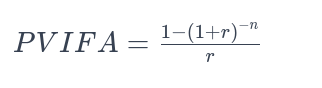
- i is the discount rate per period expressed as a decimal. In the calculator, i = the entered percentage rate / 100.
- n is the total number of payment periods.
The formula image uses r for the decimal rate; the equation above uses i to distinguish it from the calculator's percentage input.
Advanced mode then calculates:
Present value of annuity = Amount of each payment × PVIFA
PVIFA has no currency unit and is not a percentage. It is a multiplier. The present value result, by contrast, is a monetary amount.
Worked example: $100 per year for 10 years
Suppose you expect ten annual payments of $100, with the first payment one year from today. You use a 5% annual discount rate.
- Interest rate per period: 5
- Number of periods: 10
- Amount of each payment: $100 in Advanced mode
PVIFA = [1 − (1.05)−10] / 0.05 ≈ 7.721735
Present value = $100 × 7.721735 ≈ $772.17
The payments total $1,000, but their value today is $772.17 at the selected discount rate. This does not mean you receive less than $1,000 in total; it reflects the waiting time before each payment arrives.
How to interpret your result
- A higher discount rate lowers PVIFA. Future payments are worth less today when you require a higher return.
- More periods increase PVIFA for a fixed positive rate. Additional payments add value, although later payments contribute less than earlier ones.
- A larger payment increases present value proportionally. Doubling the payment doubles its present value without changing PVIFA.
For a positive rate, PVIFA is less than the number of payments. In the example, the factor of 7.721735 means that each $1 of annual payment contributes about $7.72 of total present value across the ten payments.
There is no universally “good” PVIFA. Use it to value a payment stream under a chosen discount rate, not as a standalone measure of investment quality or safety.
Important assumptions and common mistakes

- Payment timing matters. The calculator assumes end-of-period payments. For an annuity due, where payments begin immediately, multiply the ordinary-annuity present value by (1 + i). There is no payment-timing selector in this calculator.
- Payments and the discount rate stay constant. Growing payments, irregular amounts, or changing rates require a cash-flow-by-cash-flow calculation rather than one PVIFA multiplier.
- Zero interest needs special treatment. Mathematically, PVIFA equals n at a 0% rate, so present value equals payment × n. The calculator's formula divides by the rate and is undefined at exactly zero; use this shortcut instead.
- Keep inflation assumptions consistent. Use nominal cash flows with a nominal discount rate, or inflation-adjusted cash flows with a real discount rate. Do not subtract inflation twice. The Inflation Calculator can help you explore changes in purchasing power.
- Risk, fees, and taxes are not separate inputs. The result depends only on the entered rate, number of periods, and, in Advanced mode, payment amount. It does not establish whether payments are guaranteed or an investment is suitable.
Practical ways to use PVIFA
Compare a lump sum with fixed payments
Calculate the present value of the payments, then compare it with the lump-sum offer. Under the example's assumptions, $750 today is less than the $772.17 present value of ten $100 annual payments. The comparison still depends on your chosen discount rate, payment reliability, and any tax differences.
Estimate the value of retirement income
PVIFA can value a fixed pension payment over a specified number of periods. It does not model uncertain lifespan or pension increases. For broader savings planning, use the Retirement Goal Calculator.
Analyze loans and fixed-income cash flows
For a fully amortizing loan with equal end-of-period payments, payment × PVIFA equals the principal when you use the loan's periodic rate. Conversely, principal / PVIFA gives the payment before additional fees. This relationship does not, by itself, measure the loan's total borrowing cost.
For a conventional fixed-coupon bond, PVIFA can value the coupon payments, but the principal repaid at maturity must be discounted separately. The Bond Yield Calculator addresses a related bond-return question. The ROI Calculator measures return relative to investment cost, rather than the discounted value of scheduled payments.
Financial educators and advisers can use Calcopolis to build a custom annuity calculator for a WordPress website, helping visitors explore payment scenarios before making an inquiry.
Related calculators: present value versus future value
- Present Value of Annuity Calculator: Focus on today's monetary value of periodic future payments.
- Present Value Calculator: Discount a single future amount rather than a series of equal payments.
- Future Value of Annuity Calculator: Estimate what regular payments accumulate to at a future date. Its underlying annuity factor, FVIFA, compounds payments forward instead of discounting them back.
- Compound Interest Calculator: Explore how an investment balance grows through compounding over time.